The Legend of Kyrandia
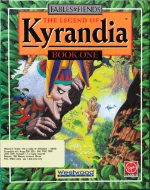 The Legend of Kyrandia, released in 1992 by Virgin Games, is a visually stunning point-and-click adventure game that takes players on a magical journey through the enchanting kingdom of Kyrandia. Developed by Westwood Studios, the game is the first in the Fables & Fiends series and introduces players to a richly detailed fantasy world filled with puzzles, humor, and danger.
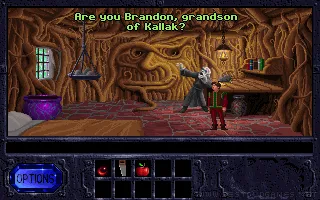
Players assume the role of Brandon, an unassuming young hero who must stop the evil jester Malcolm, who has plunged Kyrandia into chaos. Armed with wit and determination, Brandon explores lush forests, dark caves, and mystical castles, solving inventory-based puzzles and interacting with a cast of quirky characters to uncover the secrets of his lineage and save the kingdom.
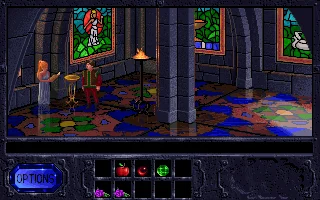
The Legend of Kyrandia is celebrated for its breathtaking hand-painted visuals, enchanting soundtrack, and intuitive gameplay. Its blend of humor, storytelling, and challenging puzzles make it a standout in the adventure genre. The game’s captivating atmosphere and engaging narrative have earned it a lasting legacy as a beloved classic among adventure gaming fans.
Genre: Adventure
Release: 1992
Developer: Westwood Studios
Publisher: Virgin Interactive
Series: The Legend of Kyrandia
Also known as: Fables & Fiends: The Legend of Kyrandia – Book One, The Legend of Kyrandia: Book One
Tags: Fantasy, Point-and-click, Mouse only
Played: 335 times in the last 12 months
Just play it!
Tip: Press Alt + Enter to toggle fullscreen mode
Quick tips — new to MS-DOS games?
- Click inside the game to give it keyboard/mouse focus.
- Ctrl + F10 — release or re-capture the mouse cursor.
- Saving varies by game — look for Save in the in-game menu (Esc or F1), or try F5 / F7.
- Some games use passwords instead of saves — note it down!
- Controls are often shown on the game's intro or title screen — don't skip them.
- 🖥️ CRT filter is on by default for that authentic monitor look. Toggle it with Alt+F7 or the CRT: ON/OFF button in the bottom-right corner of the game. Your preference is remembered.
Playing on a phone or tablet?
MS-DOS games were built for a physical keyboard. Use the
keyboard button in the game's bottom bar to bring up
the on-screen keys, or connect a Bluetooth keyboard — some games are
hard to control by touch alone.
Enjoying The Legend of Kyrandia? Rate it or leave a comment — it helps other players find the good ones.
The Legend of Kyrandia controls
| Key | Action |
|---|---|
| Left click on the scene | Walk there; click an edge or doorway to leave the screen |
| Left click on an object | Pick it up – it becomes the cursor |
| Left click while holding an object | Use it on a person or thing, drop it, or put it in an inventory slot |
| Left click on a person | Talk |
| Left click on Brandon while holding an object | Use it on himself (for example eat it) |
| Amulet gems | Click a glowing gem to use its magic |
| Options button | Load, save, game controls (music, sounds, walk speed, text speed), quit |
| Only the left mouse button is used. | |
| Without a mouse the numeric keypad moves the pointer and Enter, Insert or Space clicks. | |

Explore More
More Adventure Games:
Browse all adventure games
Browse all adventure games
Games from 1992:
See all games from 1992
See all games from 1992
Developer:
More games by Westwood Studios
More games by Westwood Studios
Publisher:
Games published by Virgin Interactive
Games published by Virgin Interactive
The Legend of Kyrandia series
- The Legend of Kyrandia (1992)
- The Legend of Kyrandia: Hand of Fate (1993)



Comments
No comments yet — be the first to say something.
New Comment