Realms of Arkania: Blade of Destiny
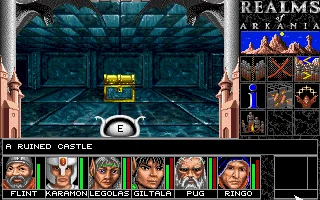
 Realms of Arkania: Blade of Destiny is a classic computer role-playing game released in 1993 by Attic Entertainment Software for MS-DOS. Based on the German tabletop RPG Das Schwarze Auge (The Dark Eye), it brought a deep and complex fantasy world to life for PC players. The game is set in the richly detailed land of Aventuria, where players take on the role of a party of heroes tasked with saving the Thorwalians from an impending orc invasion.
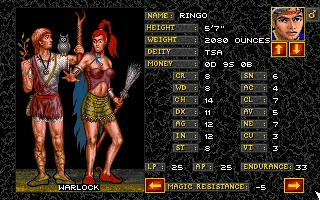
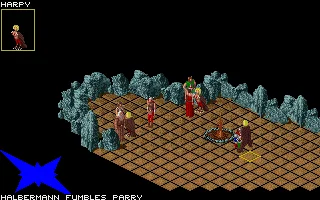
The gameplay combines traditional RPG mechanics with a strong emphasis on realism and strategy. Players create and manage a party of up to six characters, each with unique skills, attributes, and backgrounds. Exploration unfolds in both first-person 3D environments and an overhead map view, while combat is turn-based and highly tactical, requiring careful planning and resource management.
Renowned for its depth, atmosphere, and faithfulness to its pen-and-paper roots, Blade of Destiny became a milestone in European RPG design. Though challenging and sometimes unforgiving, it rewarded players with a richly immersive experience that laid the foundation for the Realms of Arkania trilogy and earned its place among early 90s role-playing classics.
Genre: RPG
Release: 1993
Developer: Attic Entertainment Software
Publisher: U.S. Gold
Series: Realms of Arkania
Also known as: Das Schwarze Auge: Die Schicksalsklinge
Tags: Fantasy, Licensed, First-person, Turn-based
Played: 83 times in the last 12 months
Just play it!
Tip: Press Alt + Enter to toggle fullscreen mode
Quick tips — new to MS-DOS games?
- Click inside the game to give it keyboard/mouse focus.
- Ctrl + F10 — release or re-capture the mouse cursor.
- Saving varies by game — look for Save in the in-game menu (Esc or F1), or try F5 / F7.
- Some games use passwords instead of saves — note it down!
- Controls are often shown on the game's intro or title screen — don't skip them.
- 🖥️ CRT filter is on by default for that authentic monitor look. Toggle it with Alt+F7 or the CRT: ON/OFF button in the bottom-right corner of the game. Your preference is remembered.
Playing on a phone or tablet?
MS-DOS games were built for a physical keyboard. Use the
keyboard button in the game's bottom bar to bring up
the on-screen keys, or connect a Bluetooth keyboard — some games are
hard to control by touch alone.
Enjoying Realms of Arkania: Blade of Destiny? Rate it or leave a comment — it helps other players find the good ones.
Realms of Arkania: Blade of Destiny controls
| Key | Action |
|---|---|
| Left click | Select (choose a menu item, move in a direction, use an icon, pick up items, pick an opponent) |
| Right click | Call up the menu of options for the current screen |
| Arrow keys | Move; scroll through options or characters |
| Enter | Select the highlighted option |
| Page Up | Open the options menu (travel options on a journey) |
| Page Down | Close the options menu |
| Ctrl+E | Review a character |
| Esc | Leave most screens and return to normal play |
| Space | Pause during dialogues |
| Ctrl+P | Pause while travelling |
Explore More
More RPG Games:
Browse all RPG games
Games from 1993:
See all games from 1993
Developer:
More games by Attic Entertainment Software
Publisher:
Games published by U.S. Gold




Comments
No comments yet — be the first to say something.
New Comment