Descent
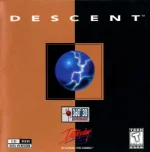 Descent, released in 1995 by Interplay Productions, is a groundbreaking first-person shooter that introduced players to full 360-degree movement in a fully 3D environment. Developed by Parallax Software, the game takes place in a series of labyrinthine mines where players pilot a high-tech spacecraft to combat rogue mining robots and rescue hostages.
The gameplay revolves around navigating claustrophobic tunnels and vast caverns while engaging in intense dogfights with enemies. Players collect weapons, power-ups, and keys to unlock new areas, all while dealing with the disorienting freedom of zero-gravity movement. The game’s six degrees of freedom (6DoF) mechanic was revolutionary for the time, offering an unprecedented sense of immersion and challenge.
Descent is celebrated for its innovative design, atmospheric soundtrack, and advanced graphics, which pushed the boundaries of PC gaming in the mid-1990s. Its mix of exploration, combat, and puzzle-solving earned it critical acclaim and a devoted fan base. As one of the pioneers of 3D gaming, Descent remains a landmark title that influenced countless games in the genre.
Genre: Shooter
Release: 1995
Developer: Parallax Software
Publisher: Interplay Productions
Series: Descent
Tags: Sci-Fi, Space, First-person, 3D, Flight, Shareware
Played: 681 times in the last 12 months
Just play it!
Tip: Press Alt + Enter to toggle fullscreen mode
Quick tips — new to MS-DOS games?
- Click inside the game to give it keyboard/mouse focus.
- Ctrl + F10 — release or re-capture the mouse cursor.
- Saving varies by game — look for Save in the in-game menu (Esc or F1), or try F5 / F7.
- Some games use passwords instead of saves — note it down!
- Controls are often shown on the game's intro or title screen — don't skip them.
- 🖥️ CRT filter is on by default for that authentic monitor look. Toggle it with Alt+F7 or the CRT: ON/OFF button in the bottom-right corner of the game. Your preference is remembered.
Playing on a phone or tablet?
MS-DOS games were built for a physical keyboard. Use the
keyboard button in the game's bottom bar to bring up
the on-screen keys, or connect a Bluetooth keyboard — some games are
hard to control by touch alone.
Enjoying Descent? Rate it or leave a comment — it helps other players find the good ones.
Descent controls
| Key | Action |
|---|---|
| A / Z | Accelerate forward / reverse |
| Arrow keys | Turn and pitch the ship |
| Q / E | Bank left / right (also Numpad 7 / 9) |
| Numpad 1 / 3 | Slide left / right |
| Numpad - / + | Slide up / down |
| Ctrl | Fire primary weapon |
| Space | Fire secondary weapon |
| 1-5 | Select primary weapon |
| 6-0 | Select secondary weapon |
| F | Fire flare |
| B | Drop proximity bomb |
| R | Rear view (hold, or tap to toggle) |
| Tab | Automap |
| These are the defaults; they can be changed under Options > Controls. | |
Descent cheats & tips
| Code | Effect |
|---|---|
| GABBAGABBAHEY | Enable cheats - type it first during play (your score is reset to 0) |
| RACERX | Invulnerability |
| SCOURGE | All weapons |
| MITZI | All keys |
| GUILE | Cloak on/off |
| TWILIGHT | Restore shields to 100 |
| FARMERJOE | Warp to a level |
| Registered version only | |
| BIGRED | All weapons |
| BRUIN | Extra life |
| FLASH | Light up the path to the exit |
| AHIMSA | Robots stop firing |


Explore More
More Shooter Games:
Browse all shooter games
Games from 1995:
See all games from 1995
Developer:
More games by Parallax Software
Publisher:
Games published by Interplay Productions


Comments
No comments yet — be the first to say something.
New Comment