Commander Keen in Goodbye, Galaxy
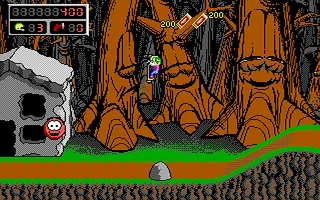
 Commander Keen in Goodbye, Galaxy!, released in 1991 by Apogee Software, is a vibrant and humorous platformer that follows the adventures of Billy Blaze, an eight-year-old genius who dons the persona of Commander Keen to save the galaxy. This two-part installment—comprising Secret of the Oracle and The Armageddon Machine—continues the series’ mix of lighthearted storytelling, challenging gameplay, and colorful visuals.
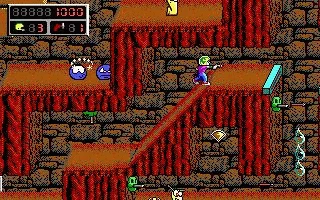
Players navigate sprawling levels filled with traps, enemies, and hidden secrets, using Keen's trusty pogo stick and neural stunner to overcome obstacles and foes. With a focus on exploration, puzzles, and precise platforming, the game delivers an engaging and accessible experience for players of all skill levels.
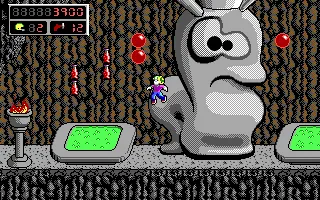
Goodbye, Galaxy! is celebrated for its smooth animation, whimsical humor, and memorable alien worlds, including the hostile Shadowlands and the mechanical Omegamatic. As a cornerstone of early PC gaming, the Commander Keen series, and especially Goodbye, Galaxy!, remains a beloved classic, embodying the charm and creativity of the shareware era.
Genre: Platformer
Release: 1991
Developer: id Software
Publisher: 3D Realms
Series: Commander Keen
Tags: Sci-Fi, Side-scrolling, Shareware
Played: 479 times in the last 12 months
Just play it!
Tip: Press Alt + Enter to toggle fullscreen mode
Quick tips — new to MS-DOS games?
- Click inside the game to give it keyboard/mouse focus.
- Ctrl + F10 — release or re-capture the mouse cursor.
- Saving varies by game — look for Save in the in-game menu (Esc or F1), or try F5 / F7.
- Some games use passwords instead of saves — note it down!
- Controls are often shown on the game's intro or title screen — don't skip them.
- 🖥️ CRT filter is on by default for that authentic monitor look. Toggle it with Alt+F7 or the CRT: ON/OFF button in the bottom-right corner of the game. Your preference is remembered.
Playing on a phone or tablet?
MS-DOS games were built for a physical keyboard. Use the
keyboard button in the game's bottom bar to bring up
the on-screen keys, or connect a Bluetooth keyboard — some games are
hard to control by touch alone.
Enjoying Commander Keen in Goodbye, Galaxy? Rate it or leave a comment — it helps other players find the good ones.
Commander Keen in Goodbye, Galaxy controls
| Key | Action |
|---|---|
| Left / Right arrows | Walk |
| Up / Down arrows | Look up / down, climb poles; Up also enters doorways |
| Ctrl | Jump |
| Alt | Pogo stick on / off |
| Space | Fire the neural stunner |
| Down + Ctrl | Drop down through a platform |
| Enter | Status screen |
| Esc | Main menu – save, load, configure |
| F1 | Help |
| Keys can be redefined under Configure in the main menu. | |
Commander Keen in Goodbye, Galaxy cheats & tips
| Code | Effect |
|---|---|
| B + A + T | All four gems, 99 shots and an extra life |
| A + 2 + Enter | Turn on debug mode (needed for the F10 codes below) |
| F10 + G | God mode on / off |
| F10 + I | Free items – gems, 99 shots and 3000 points |
| F10 + J | Jump cheat – keep jumping in mid-air |
| F10 + N | No clipping |
| F10 + W | Warp to a level |
| F10 + E | Finish the current level |
| F10 + Y | Reveal hidden passages |
| Hold the keys of a combination down together. | |
Explore More
More Platformer Games:
Browse all platformer games
Browse all platformer games
Games from 1991:
See all games from 1991
See all games from 1991
Developer:
More games by id Software
More games by id Software
Publisher:
Games published by 3D Realms
Games published by 3D Realms
Comments
No comments yet — be the first to say something.
New Comment