Star Wars: TIE Fighter
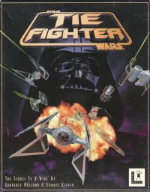 Star Wars: TIE Fighter, released in 1994 by LucasArts, is a legendary space combat simulator that puts players in the cockpit of the Galactic Empire’s iconic TIE Fighters. As an Imperial pilot, players embark on a series of challenging missions, battling Rebel forces and maintaining order in the galaxy.
The game features a compelling campaign that intertwines with the events of the original Star Wars trilogy, offering a unique perspective on the conflict from the Empire’s point of view. Players complete a variety of mission objectives, including dogfights, escort missions, and space station assaults, all while navigating the dangers of asteroid fields and hostile fleets. Mastering different Imperial spacecraft, from standard TIE Fighters to powerful TIE Bombers and Interceptors, is key to success.
Praised for its sophisticated flight mechanics, tactical gameplay, and cinematic storytelling, TIE Fighter set a new standard for space simulators. The game’s detailed graphics, dynamic soundtrack, and rich lore make it a must-play for Star Wars fans and space combat enthusiasts alike. Its balance of challenging gameplay and immersive storytelling has cemented its status as one of the greatest PC games of all time.
Genre: Simulation
Release: 1994
Developer: Totally Games
Publisher: LucasArts
Series: Star Wars
Tags: Sci-Fi, Space, Flight, 3D, Licensed
Played: 688 times in the last 12 months
Just play it!
Tip: Press Alt + Enter to toggle fullscreen mode
Quick tips — new to MS-DOS games?
- Click inside the game to give it keyboard/mouse focus.
- Ctrl + F10 — release or re-capture the mouse cursor.
- Saving varies by game — look for Save in the in-game menu (Esc or F1), or try F5 / F7.
- Some games use passwords instead of saves — note it down!
- Controls are often shown on the game's intro or title screen — don't skip them.
- 🖥️ CRT filter is on by default for that authentic monitor look. Toggle it with Alt+F7 or the CRT: ON/OFF button in the bottom-right corner of the game. Your preference is remembered.
Playing on a phone or tablet?
MS-DOS games were built for a physical keyboard. Use the
keyboard button in the game's bottom bar to bring up
the on-screen keys, or connect a Bluetooth keyboard — some games are
hard to control by touch alone.
Enjoying Star Wars: TIE Fighter? Rate it or leave a comment — it helps other players find the good ones.
Star Wars: TIE Fighter controls
| Key | Action |
|---|---|
| Joystick or mouse | Steer; button 1 fires |
| + / - | Increase / decrease throttle |
| [ / ] / Backspace / \ | Throttle to one third / two thirds / full / zero |
| Enter | Match the target's speed |
| W | Cycle weapons |
| X | Cycle firing configurations |
| F9 / F10 | Adjust laser / shield recharge rate |
| ' / ; | Move energy from lasers to shields / from shields to lasers |
| S | Cycle shield settings |
| T / Y | Next / previous target |
| R | Target the closest enemy |
| M / G | Map / mission goals |
| H | Hyperspace home (ends the mission) |
| K | Show the full keyboard reference in flight |


Explore More
More Simulation Games:
Browse all simulation games
Games from 1994:
See all games from 1994
Developer:
More games by Totally Games
Publisher:
Games published by LucasArts
The Star Wars series
- Star Wars: X-Wing (1993)
- Star Wars: TIE Fighter (1994)
- Star Wars: Dark Forces (1995)
Comments
No comments yet — be the first to say something.
New Comment