Anvil of Dawn
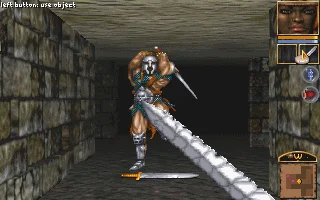
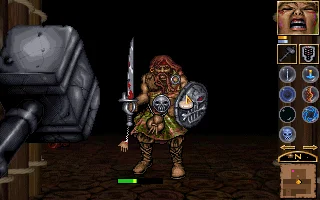
 Anvil of Dawn is a classic first-person dungeon crawler released for MS-DOS in 1995 by New World Computing. Set in a dark fantasy realm threatened by chaos, the game casts players as a lone hero chosen to confront the malevolent warlord who has unleashed monstrous forces upon the land. Blending traditional grid-based exploration with real-time combat, it delivers a tense and methodical RPG experience rooted in strategic positioning, timing, and resource management.
Players choose from several distinct character classes, each offering unique starting attributes, skills, and progression paths. The game emphasizes atmospheric level design, featuring labyrinthine dungeons, hidden chambers, intricate puzzles, and lethal traps. Combat unfolds in real time within a tile-based movement system, requiring careful stamina management and tactical decision-making rather than button-mashing reflexes.
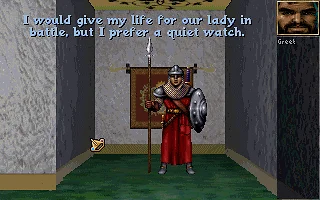
Technically impressive for its time, Anvil of Dawn stands out with richly detailed pre-rendered environments, fluid enemy animations, and a moody soundtrack that reinforces its oppressive tone. Its combination of classic dungeon-crawling mechanics, immersive audiovisual presentation, and deliberate pacing has earned it a lasting reputation among fans of 1990s computer role-playing games.
Genre: RPG
Release: 1995
Developer: DreamForge Intertainment
Publisher: New World Computing
Tags: Fantasy, Dungeon crawler, First-person
Played: 185 times in the last 12 months
Just play it!
Tip: Press Alt + Enter to toggle fullscreen mode
Quick tips — new to MS-DOS games?
- Click inside the game to give it keyboard/mouse focus.
- Ctrl + F10 — release or re-capture the mouse cursor.
- Saving varies by game — look for Save in the in-game menu (Esc or F1), or try F5 / F7.
- Some games use passwords instead of saves — note it down!
- Controls are often shown on the game's intro or title screen — don't skip them.
- 🖥️ CRT filter is on by default for that authentic monitor look. Toggle it with Alt+F7 or the CRT: ON/OFF button in the bottom-right corner of the game. Your preference is remembered.
Playing on a phone or tablet?
MS-DOS games were built for a physical keyboard. Use the
keyboard button in the game's bottom bar to bring up
the on-screen keys, or connect a Bluetooth keyboard — some games are
hard to control by touch alone.
Enjoying Anvil of Dawn? Rate it or leave a comment — it helps other players find the good ones.
Anvil of Dawn controls
| Key | Action |
|---|---|
| Left click at the edge of the view | Move or turn in the direction of the arrow (hold to keep moving) |
| Left click on an enemy | Attack with the weapon in the left weapon box |
| Right click on an enemy | Attack with the weapon in the other box |
| R / L | Use the object in the right / left hand |
| G / D | Get / drop the object on the cursor |
| T | Throw the object on the cursor |
| P | Push or pull a button or lever |
| C | Character sheet |
| A | Automap |
| V | Hide or show the interface |
| F1 | Help |
| F2 | Save / restore |
| F3 | Options screen |
Explore More
More RPG Games:
Browse all RPG games
Browse all RPG games
Games from 1995:
See all games from 1995
See all games from 1995
Developer:
More games by DreamForge Intertainment
More games by DreamForge Intertainment
Publisher:
Games published by New World Computing
Games published by New World Computing




Comments
No comments yet — be the first to say something.
New Comment