Paperboy 2
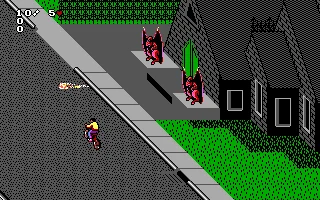
 Paperboy 2 is an action-packed arcade game released for MS-DOS in 1991 by Mindscape. As the sequel to the classic Paperboy, the game puts players in the role of a newspaper delivery boy or girl riding a bicycle through chaotic suburban neighborhoods. The objective is simple: deliver newspapers to subscribers while avoiding countless obstacles and hazards along the way. However, what seems like an ordinary morning paper route quickly turns into a hilarious and dangerous adventure.
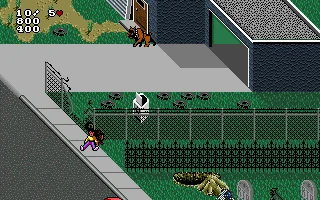
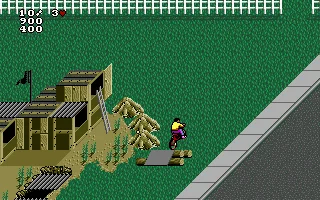
Unlike its predecessor, Paperboy 2 features houses on both sides of the street, making newspaper deliveries even more challenging. Players must dodge moving cars, aggressive dogs, pedestrians, and bizarre obstacles while carefully aiming their newspapers at customers' doorsteps and mailboxes. Extra points can be earned by performing special actions, including smashing windows or saving innocent bystanders from dangerous situations. The game also offers three difficulty levels, each presenting increasingly demanding routes that require quick reflexes and precise timing.
With its colorful isometric graphics, quirky humor, and addictive arcade-style gameplay, Paperboy 2 captures the spirit of early 1990s computer gaming. The unpredictable obstacles, amusing animations, and entertaining newspaper headlines add personality to every delivery run. Although the gameplay can be frustratingly difficult at times, the constant pursuit of a higher score keeps players coming back for another attempt. Paperboy 2 remains a charming and challenging retro classic that proves delivering newspapers is anything but a boring job.
Just play it!
Tip: Press Alt + Enter to toggle fullscreen mode
Quick tips — new to MS-DOS games?
- Click inside the game to give it keyboard/mouse focus.
- Ctrl + F10 — release or re-capture the mouse cursor.
- Saving varies by game — look for Save in the in-game menu (Esc or F1), or try F5 / F7.
- Some games use passwords instead of saves — note it down!
- Controls are often shown on the game's intro or title screen — don't skip them.
- 🖥️ CRT filter is on by default for that authentic monitor look. Toggle it with Alt+F7 or the CRT: ON/OFF button in the bottom-right corner of the game. Your preference is remembered.
Playing on a phone or tablet?
MS-DOS games were built for a physical keyboard. Use the
keyboard button in the game's bottom bar to bring up
the on-screen keys, or connect a Bluetooth keyboard — some games are
hard to control by touch alone.
Explore More
More Action Games:
Browse all action games
Browse all action games
Games from 1991:
See all games from 1991
See all games from 1991
Developer:
More games by Tengen
More games by Tengen
Publisher:
Games published by Mindscape
Games published by Mindscape

Comments
No comments yet — be the first to say something.
New Comment