Turn It
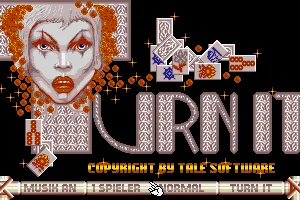
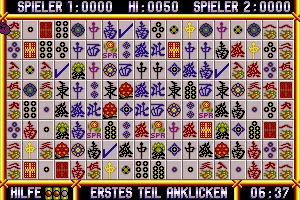
 Turn It is a puzzle game developed by Tale Software and published by Kingsoft in 1990 for MS-DOS. Inspired by traditional Mahjong solitaire, the game introduces a distinctive twist on the classic tile-matching formula. Instead of stacked tiles, players face a flat board filled with colorful symbols, with the objective of clearing the entire playing field by matching identical pairs.
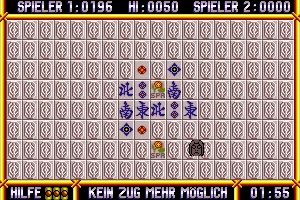
The gameplay requires careful planning and quick thinking, as matching tiles can only be removed when a clear path connects them. Each move affects the remaining possibilities, making it essential to choose pairs strategically to avoid reaching a dead end. Turn It features 50 levels, three difficulty settings, and a time limit that adds extra pressure. Players can enjoy the challenge alone or compete against a friend in the two-player mode, aiming to achieve the highest score.
With its straightforward controls, colorful graphics, and increasingly challenging puzzles, Turn It offers an entertaining combination of logic, strategy, and fast decision-making. Although its presentation is relatively simple compared to more elaborate puzzle games of the era, its addictive gameplay provides plenty of replay value. For fans of classic Mahjong-inspired games and retro puzzle challenges, Turn It remains an interesting and enjoyable piece of early 1990s PC gaming history.
Just play it!
Tip: Press Alt + Enter to toggle fullscreen mode
Quick tips — new to MS-DOS games?
- Click inside the game to give it keyboard/mouse focus.
- Ctrl + F10 — release or re-capture the mouse cursor.
- Saving varies by game — look for Save in the in-game menu (Esc or F1), or try F5 / F7.
- Some games use passwords instead of saves — note it down!
- Controls are often shown on the game's intro or title screen — don't skip them.
- 🖥️ CRT filter is on by default for that authentic monitor look. Toggle it with Alt+F7 or the CRT: ON/OFF button in the bottom-right corner of the game. Your preference is remembered.
Playing on a phone or tablet?
MS-DOS games were built for a physical keyboard. Use the
keyboard button in the game's bottom bar to bring up
the on-screen keys, or connect a Bluetooth keyboard — some games are
hard to control by touch alone.
Explore More
More Puzzle Games:
Browse all puzzle games
Browse all puzzle games
Games from 1990:
See all games from 1990
See all games from 1990
Developer:
More games by Tale Software
More games by Tale Software
Publisher:
Games published by Kingsoft GmbH
Games published by Kingsoft GmbH

Comments
No comments yet — be the first to say something.
New Comment