Locomotion
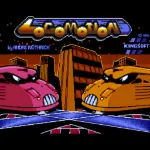 Locomotion is a railway-themed puzzle game developed by Prestige Softwareentwicklung and released for MS-DOS in 1992. Viewed from a top-down perspective, the game puts players in charge of a busy railway network filled with tracks, switches, and stations. Instead of controlling individual locomotives, players take on the role of a railway dispatcher, responsible for guiding trains safely to their designated destinations.
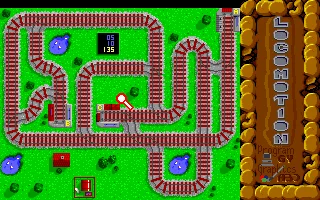
The gameplay revolves around changing railway switches in real time to direct trains along the correct routes. Trains appear at unpredictable intervals, each heading toward a specific station, and players must successfully deliver a required number of them before time runs out. Incorrectly positioned switches can delay trains, while collisions result in penalties. As more trains enter the network, careful planning, quick reactions, and precise timing become essential to keeping everything under control.
Featuring colorful VGA graphics, AdLib music, and increasingly challenging railway layouts, Locomotion combines straightforward mechanics with surprisingly demanding gameplay. Each new level introduces more complicated track arrangements and heavier traffic, testing the player's ability to manage multiple trains simultaneously. With its addictive combination of strategy, logic, and arcade-style action, Locomotion remains an entertaining example of early 1990s DOS puzzle gaming.
Just play it!
Tip: Press Alt + Enter to toggle fullscreen mode
Quick tips — new to MS-DOS games?
- Click inside the game to give it keyboard/mouse focus.
- Ctrl + F10 — release or re-capture the mouse cursor.
- Saving varies by game — look for Save in the in-game menu (Esc or F1), or try F5 / F7.
- Some games use passwords instead of saves — note it down!
- Controls are often shown on the game's intro or title screen — don't skip them.
- 🖥️ CRT filter is on by default for that authentic monitor look. Toggle it with Alt+F7 or the CRT: ON/OFF button in the bottom-right corner of the game. Your preference is remembered.
Playing on a phone or tablet?
MS-DOS games were built for a physical keyboard. Use the
keyboard button in the game's bottom bar to bring up
the on-screen keys, or connect a Bluetooth keyboard — some games are
hard to control by touch alone.
Explore More
More Puzzle Games:
Browse all puzzle games
Browse all puzzle games
Games from 1992:
See all games from 1992
See all games from 1992
Developer:
More games by André Wüthrich
More games by André Wüthrich
Publisher:
Games published by Prestige
Games published by Prestige
Comments
No comments yet — be the first to say something.
New Comment