Ghosts 'n Goblins
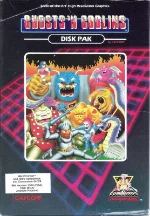
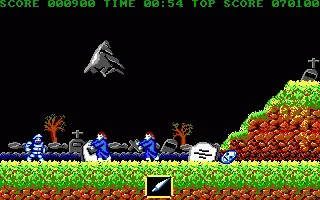
Ghosts 'n Goblins is Capcom's 1985 arcade platformer, directed by Tokuro Fujiwara and known in Japan as Makaimura ("Demon World Village"). This is the 1987 IBM PC version, converted by Pacific Dataworks International and published in North America by Capcom U.S.A. As the knight Sir Arthur, you set out to rescue the princess, carried off by the demon Astaroth, and fight your way past zombies, ghosts and demons, starting in a graveyard.
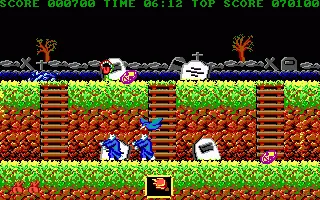
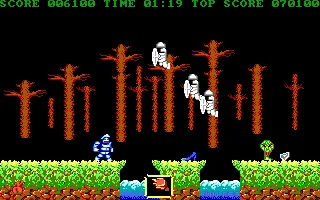
Arthur fights with whatever he picks up along the way – a lance, daggers, a torch, an axe or a shield – and each has its uses: some bosses shrug off certain weapons, and the final fight demands the shield. One hit knocks his armour off and leaves him running in his underwear; a second costs a life. Every stage runs against the clock, and on the harder difficulty settings enemies move faster. The PC version draws the game in 16-colour EGA, flips from screen to screen instead of scrolling, and plays the arcade tune and sound effects through the PC speaker. There is a two-player mode as well.
The game is remembered above all for its difficulty, and it is still regularly named among the hardest games ever made. Enemies appear without warning, two hits end a life, and beating Astaroth is not the end: the game sends you back to the starting point to fight through it all a second time before the true ending. It was a major arcade hit and began a series that continued with Ghouls 'n Ghosts and Super Ghouls 'n Ghosts.
Genre: Platformer
Release: 1985
Developer: Pacific Dataworks International
Publisher: Capcom
Series: Ghosts 'n Goblins
Also known as: Makaimura
Tags: Arcade port, Fantasy, Horror, Run and gun
Just play it!
Quick tips — new to MS-DOS games?
- Click inside the game to give it keyboard/mouse focus.
- Ctrl + F10 — release or re-capture the mouse cursor.
- Saving varies by game — look for Save in the in-game menu (Esc or F1), or try F5 / F7.
- Some games use passwords instead of saves — note it down!
- Controls are often shown on the game's intro or title screen — don't skip them.
- 🖥️ CRT filter is on by default for that authentic monitor look. Toggle it with Alt+F7 or the CRT: ON/OFF button in the bottom-right corner of the game. Your preference is remembered.
Enjoying Ghosts 'n Goblins? Rate it or leave a comment — it helps other players find the good ones.
Ghosts 'n Goblins controls
| Key | Action |
|---|---|
| F1 | Start the game |
| F3 | Music on / off |
| F5 | One or two players |
| F7 | Difficulty – Novice, Intermediate or Advanced |
Explore More
Browse all platformer games
See all games from 1985
Games published by Capcom

Comments
No comments yet — be the first to say something.
New Comment