The Lost Files of Sherlock Holmes
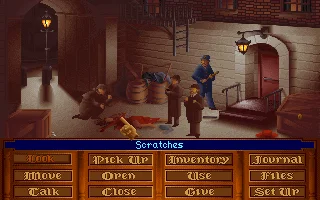
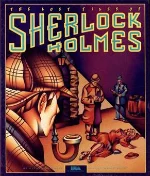 The Lost Files of Sherlock Holmes, released in 1992 by Electronic Arts, is a point-and-click adventure that puts players in the role of the legendary detective. Set in Victorian London, the story begins with a brutal murder outside a theatre in Mayfair, drawing Sherlock Holmes and Dr. Watson into a web of intrigue involving dark alleys, elegant theaters, and seedy taverns.
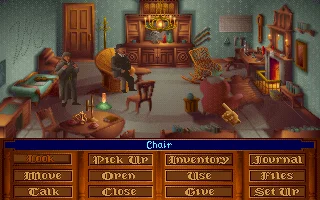
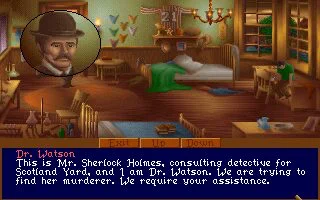
The gameplay emphasizes investigation and deduction rather than action. Players gather clues, interrogate witnesses, and piece together evidence while navigating richly detailed locations. The interface allows for a wide range of interactions, encouraging players to think like Holmes as they unravel a complex and suspenseful case.
Praised for its atmospheric graphics, authentic period detail, and strong writing, The Lost Files of Sherlock Holmes captured the essence of Arthur Conan Doyle’s world. Its thoughtful puzzles and faithful character portrayals made it a standout among early 1990s adventure games and a favorite for mystery enthusiasts.
Genre: Adventure
Release: 1992
Developer: Mythos Software
Publisher: Electronic Arts
Series: The Lost Files of Sherlock Holmes
Also known as: The Lost Files of Sherlock Holmes: The Case of the Serrated Scalpel
Tags: Detective, Historical, Point-and-click
Played: 153 times in the last 12 months
Just play it!
Tip: Press Alt + Enter to toggle fullscreen mode
Quick tips — new to MS-DOS games?
- Click inside the game to give it keyboard/mouse focus.
- Ctrl + F10 — release or re-capture the mouse cursor.
- Saving varies by game — look for Save in the in-game menu (Esc or F1), or try F5 / F7.
- Some games use passwords instead of saves — note it down!
- Controls are often shown on the game's intro or title screen — don't skip them.
- 🖥️ CRT filter is on by default for that authentic monitor look. Toggle it with Alt+F7 or the CRT: ON/OFF button in the bottom-right corner of the game. Your preference is remembered.
Playing on a phone or tablet?
MS-DOS games were built for a physical keyboard. Use the
keyboard button in the game's bottom bar to bring up
the on-screen keys, or connect a Bluetooth keyboard — some games are
hard to control by touch alone.
Enjoying The Lost Files of Sherlock Holmes? Rate it or leave a comment — it helps other players find the good ones.
The Lost Files of Sherlock Holmes controls
| Key | Action |
|---|---|
| Left click on a command, or press its first letter | Switch it on (Look, Move, Talk, Pick up, Open, Close); select it again to switch it off |
| Left click on a person or object | Apply the active command to it |
| Left click on the scene with no command active | Walk Holmes there; walk to the edge of the screen to leave |
| Inventory, Use, Give | Show what Holmes is carrying and look at, use or give an item |
| Journal | Read Watson's record of every conversation |
| Files | Save, load or quit |
| Set Up | Sound, voices, text and control options |
| Auto Help highlights Look, Talk, Open or Close by itself when the pointer passes over something they work on. | |
Explore More
More Adventure Games:
Browse all adventure games
Games from 1992:
See all games from 1992
Developer:
More games by Mythos Software
Publisher:
Games published by Electronic Arts


Comments
No comments yet — be the first to say something.
New Comment