Shanghai
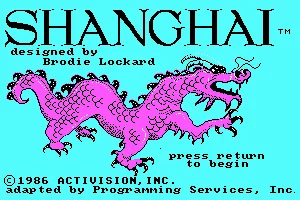
 Released by Activision in 1986, Shanghai is a classic puzzle game for MS-DOS that brings the timeless appeal of mahjong solitaire to personal computers. Originally created by Brodie Lockard, the game challenges players to clear a carefully arranged formation of 144 beautifully patterned tiles. Although inspired by traditional Chinese mahjong, Shanghai introduces its own simple yet addictive rules, offering an engaging experience that combines observation, patience, and strategic thinking.
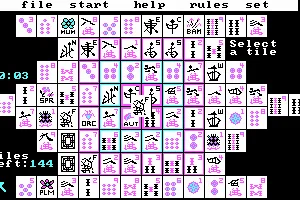
The objective is to remove all tiles from the board by matching identical pairs. However, only tiles that are not covered by others and have at least one free side can be selected. Every move requires careful consideration, as removing the wrong pair may block future combinations and leave the puzzle unsolvable. The game features different challenges, randomized tile arrangements, and additional playing modes, including timed competitions and two-player options, providing plenty of variety and replay value.
Despite its modest graphics and straightforward presentation, Shanghai became one of the most recognizable puzzle games of its era and helped popularize computerized mahjong solitaire. Its relaxing atmosphere, intuitive gameplay, and surprisingly deep strategy make it a rewarding experience for both casual players and dedicated puzzle enthusiasts. Even decades after its original release, Shanghai remains a charming example of classic DOS gaming, proving that great gameplay does not require complicated mechanics or spectacular visuals.
Just play it!
Tip: Press Alt + Enter to toggle fullscreen mode
Quick tips — new to MS-DOS games?
- Click inside the game to give it keyboard/mouse focus.
- Ctrl + F10 — release or re-capture the mouse cursor.
- Saving varies by game — look for Save in the in-game menu (Esc or F1), or try F5 / F7.
- Some games use passwords instead of saves — note it down!
- Controls are often shown on the game's intro or title screen — don't skip them.
- 🖥️ CRT filter is on by default for that authentic monitor look. Toggle it with Alt+F7 or the CRT: ON/OFF button in the bottom-right corner of the game. Your preference is remembered.
Playing on a phone or tablet?
MS-DOS games were built for a physical keyboard. Use the
keyboard button in the game's bottom bar to bring up
the on-screen keys, or connect a Bluetooth keyboard — some games are
hard to control by touch alone.
Explore More
More Puzzle Games:
Browse all puzzle games
Browse all puzzle games
Games from 1986:
See all games from 1986
See all games from 1986
Developer:
More games by Activision
More games by Activision


Comments
No comments yet — be the first to say something.
New Comment