The Elder Scrolls: Arena
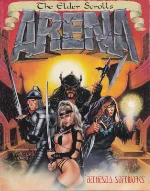 The Elder Scrolls: Arena is the first entry in Bethesda Softworks’ acclaimed fantasy RPG series, released for MS-DOS in 1994. The game introduces players to the vast continent of Tamriel, offering an unusually large, procedurally generated world for its time. As the unnamed hero, you embark on a quest to rescue Emperor Uriel Septim VII from the treacherous Imperial Battlemage, Jagar Tharn.
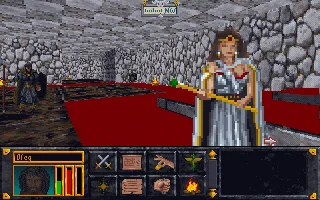
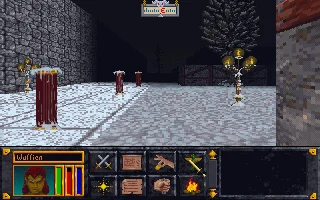
Gameplay centers on real-time first-person combat, dungeon exploration, and an open-ended structure that allows players to travel across multiple provinces. Towns, guilds, and quests create a sense of living world, while character creation and spellcrafting offer deep customization. Arena’s ambitious scale made it a groundbreaking RPG experience in the early 1990s.
Despite its age, Arena remains a fascinating look at the origins of The Elder Scrolls series. Its blending of open-world exploration, rich lore, and player freedom laid the foundation for future titles like Daggerfall, Morrowind, and Skyrim. It stands today as a classic milestone in PC role-playing history.
Genre: RPG
Release: 1994
Developer: Bethesda Softworks
Publisher: -
Series: The Elder Scrolls
Tags: Fantasy, First-person, 3D, Open world
Played: 197 times in the last 12 months
Just play it!
Tip: Press Alt + Enter to toggle fullscreen mode
Quick tips — new to MS-DOS games?
- Click inside the game to give it keyboard/mouse focus.
- Ctrl + F10 — release or re-capture the mouse cursor.
- Saving varies by game — look for Save in the in-game menu (Esc or F1), or try F5 / F7.
- Some games use passwords instead of saves — note it down!
- Controls are often shown on the game's intro or title screen — don't skip them.
- 🖥️ CRT filter is on by default for that authentic monitor look. Toggle it with Alt+F7 or the CRT: ON/OFF button in the bottom-right corner of the game. Your preference is remembered.
Playing on a phone or tablet?
MS-DOS games were built for a physical keyboard. Use the
keyboard button in the game's bottom bar to bring up
the on-screen keys, or connect a Bluetooth keyboard — some games are
hard to control by touch alone.
Enjoying The Elder Scrolls: Arena? Rate it or leave a comment — it helps other players find the good ones.
The Elder Scrolls: Arena controls
| Key | Action |
|---|---|
| Left click (hold) with the arrow pointer | Walk that way; the further from the centre, the faster |
| Left click with the X pointer | Interact (talk, open, pick up treasure) |
| Right click with the X pointer | Identify a creature or a building |
| Right click while holding the left button | Jump (J; Shift+J: standing long jump) |
| A | Draw or sheathe the weapon |
| Hold right button and move the mouse (weapon drawn) | Swing the weapon |
| C | Cast a spell |
| U / P | Use an item / pick a lock or steal |
| S / L | Character status / logbook |
| M | Automap (Shift+M: continental map for travel) |
| R | Rest (camp) |
| F1 | Character sheet |
| Esc | Setup menu (save, load, detail, sound) |
The Elder Scrolls: Arena cheats & tips
| Code | Effect |
|---|---|
| Starting dungeon | Explore it thoroughly; it holds money, weapons and magic items, and you can leave at about level 3 |
| Safe rest | Areas raised off the floor are safe to rest in while no living monster is in range |
| Spells round corners | A spell needs room to fire, so slide out a little further before casting or it hits the wall |
| Noble quests | Rulers offer them only once your level and reputation are high enough |
| Preparation | Stock up on potions and magic items before entering a dungeon |

Explore More
More RPG Games:
Browse all RPG games
Browse all RPG games
Games from 1994:
See all games from 1994
See all games from 1994
Developer:
More games by Bethesda Softworks
More games by Bethesda Softworks
Comments
No comments yet — be the first to say something.
New Comment