Fighter Bomber
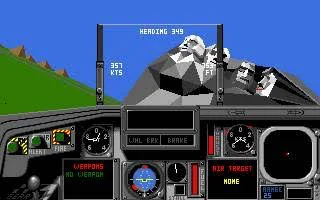
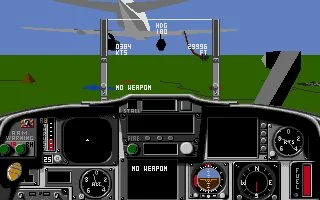
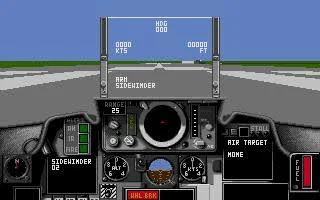
 Fighter Bomber is a combat flight simulator developed by Vektor Grafix and released for MS-DOS in 1989. Known as Strike Aces in the United States, the game puts you in the cockpit of some of the era’s most recognizable military jets and challenges you to prove your flying skills in the annual Strategic Air Command Bombing and Navigation Competition.
Based at Ellsworth Air Force Base in South Dakota, the competition consists of a series of demanding missions in which pilots are judged on their performance and awarded points. Players can choose from six different aircraft, select an appropriate weapons loadout, and take on bombing and navigation objectives across a large 3D environment inspired by the landscapes of the northern United States. The ultimate goal is to outperform the other crews and claim the prestigious Curtis E. LeMay Trophy.
With its polygonal 3D graphics, cockpit-based presentation and emphasis on both navigation and combat, Fighter Bomber offered an ambitious simulation experience for its time. Rather than focusing purely on fast arcade action, the game asks players to learn their aircraft, plan their approach and complete objectives with precision. For fans of early PC flight simulators, it remains an interesting example of how developers were bringing increasingly sophisticated military aviation simulations to home computers at the end of the 1980s.
Just play it!
Tip: Press Alt + Enter to toggle fullscreen mode
Quick tips — new to MS-DOS games?
- Click inside the game to give it keyboard/mouse focus.
- Ctrl + F10 — release or re-capture the mouse cursor.
- Saving varies by game — look for Save in the in-game menu (Esc or F1), or try F5 / F7.
- Some games use passwords instead of saves — note it down!
- Controls are often shown on the game's intro or title screen — don't skip them.
- 🖥️ CRT filter is on by default for that authentic monitor look. Toggle it with Alt+F7 or the CRT: ON/OFF button in the bottom-right corner of the game. Your preference is remembered.
Playing on a phone or tablet?
MS-DOS games were built for a physical keyboard. Use the
keyboard button in the game's bottom bar to bring up
the on-screen keys, or connect a Bluetooth keyboard — some games are
hard to control by touch alone.
Explore More
More Simulation Games:
Browse all simulation games
Browse all simulation games
Games from 1989:
See all games from 1989
See all games from 1989
Developer:
More games by Vektor Grafix
More games by Vektor Grafix
Publisher:
Games published by Activision
Games published by Activision



Comments
No comments yet — be the first to say something.
New Comment