The Legend of Kyrandia: Hand of Fate
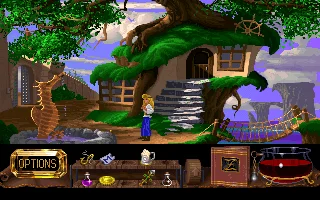
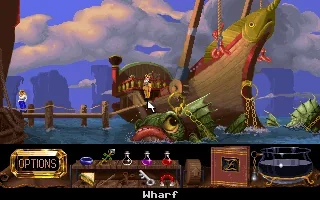
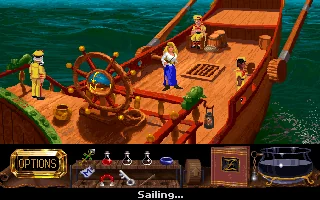
 The Legend of Kyrandia: Hand of Fate is the second installment in the acclaimed point-and-click adventure series developed by Westwood Studios and released for MS-DOS in 1993. This time, players take on the role of the witty and resourceful Zanthia, a royal mystic tasked with saving the kingdom of Kyrandia from vanishing into oblivion.
Featuring richly hand-drawn VGA graphics, whimsical characters, and clever puzzles, Hand of Fate builds on the humor and charm of the original while introducing a new alchemy-based inventory system. With its engaging story, vibrant world, and memorable soundtrack, the game is a standout entry in the golden age of graphic adventures.
Genre: Adventure
Release: 1993
Developer: Westwood Studios
Publisher: Virgin Interactive
Series: The Legend of Kyrandia
Also known as: Fables & Fiends: The Legend of Kyrandia – Book Two: The Hand of Fate, The Legend of Kyrandia: Book Two – The Hand of Fate
Tags: Fantasy, Comedy, Point-and-click, Mouse only
Played: 109 times in the last 12 months
Just play it!
Tip: Press Alt + Enter to toggle fullscreen mode
Quick tips — new to MS-DOS games?
- Click inside the game to give it keyboard/mouse focus.
- Ctrl + F10 — release or re-capture the mouse cursor.
- Saving varies by game — look for Save in the in-game menu (Esc or F1), or try F5 / F7.
- Some games use passwords instead of saves — note it down!
- Controls are often shown on the game's intro or title screen — don't skip them.
- 🖥️ CRT filter is on by default for that authentic monitor look. Toggle it with Alt+F7 or the CRT: ON/OFF button in the bottom-right corner of the game. Your preference is remembered.
Playing on a phone or tablet?
MS-DOS games were built for a physical keyboard. Use the
keyboard button in the game's bottom bar to bring up
the on-screen keys, or connect a Bluetooth keyboard — some games are
hard to control by touch alone.
Enjoying The Legend of Kyrandia: Hand of Fate? Rate it or leave a comment — it helps other players find the good ones.
The Legend of Kyrandia: Hand of Fate controls
| Key | Action |
|---|---|
| Left click on the scene | Walk there; click an edge to leave the screen |
| Left click on an object | Pick it up – it becomes the cursor |
| Left click while holding an object | Use it on a person or thing, drop it, or put it in an inventory slot |
| Left click on a person | Talk |
| Left click on Zanthia while holding an object | Use it on herself (eat or drink it) |
| Wheel beside the inventory | Cycle through the rows of inventory slots |
| Spellbook | Open the potion recipes |
| Cauldron | Click ingredients on it to mix a potion; click an empty flask on it to fill the flask |
| Options gem | Load, save or delete a game, game controls, quit |
| Esc | Skip the introduction |
| Only the left mouse button is used. | |
Explore More
More Adventure Games:
Browse all adventure games
Games from 1993:
See all games from 1993
Developer:
More games by Westwood Studios
Publisher:
Games published by Virgin Interactive
The Legend of Kyrandia series
- The Legend of Kyrandia (1992)
- The Legend of Kyrandia: Hand of Fate (1993)





Comments
No comments yet — be the first to say something.
New Comment