DragonStrike
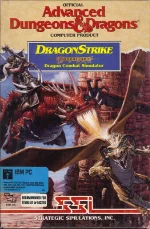 DragonStrike is a fantasy flight-combat simulator that puts players in the saddle of a mighty dragon, soaring across the war-torn skies of Krynn. Developed by Westwood Associates and published by Strategic Simulations, Inc., the game blends arcade-style action with light simulation elements, offering a unique twist on the typical flight combat formula of its era.
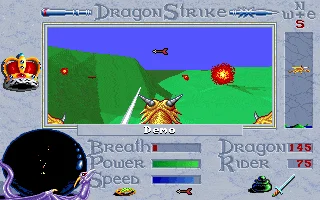
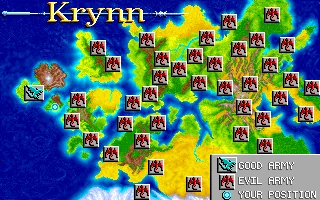
Set in the rich universe of the Dragonlance setting, DragonStrike challenges players to complete a series of missions ranging from escorting allies to engaging enemy dragons and ground forces. Each mission demands careful maneuvering, timing, and resource management, as players must balance offensive attacks with defensive flying to survive intense aerial battles. The perspective shifts between first-person cockpit view and cinematic angles, enhancing immersion and emphasizing the scale of combat.
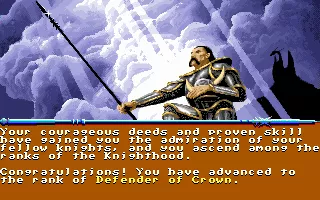
What makes DragonStrike stand out is its atmospheric presentation and narrative framing, supported by voice acting and a storyline that unfolds between missions. While the controls can feel demanding by modern standards, the game rewards persistence with a satisfying sense of mastery. For fans of classic PC gaming and fantasy settings, DragonStrike remains a memorable example of early 1990s experimentation in genre fusion.
Genre: Action
Release: 1990
Developer: Westwood Studios
Publisher: Strategic Simulations
Tags: Fantasy, Dungeons & Dragons, Flight, 3D, First-person
Played: 145 times in the last 12 months
Just play it!
Tip: Press Alt + Enter to toggle fullscreen mode
Quick tips — new to MS-DOS games?
- Click inside the game to give it keyboard/mouse focus.
- Ctrl + F10 — release or re-capture the mouse cursor.
- Saving varies by game — look for Save in the in-game menu (Esc or F1), or try F5 / F7.
- Some games use passwords instead of saves — note it down!
- Controls are often shown on the game's intro or title screen — don't skip them.
- 🖥️ CRT filter is on by default for that authentic monitor look. Toggle it with Alt+F7 or the CRT: ON/OFF button in the bottom-right corner of the game. Your preference is remembered.
Playing on a phone or tablet?
MS-DOS games were built for a physical keyboard. Use the
keyboard button in the game's bottom bar to bring up
the on-screen keys, or connect a Bluetooth keyboard — some games are
hard to control by touch alone.
Enjoying DragonStrike? Rate it or leave a comment — it helps other players find the good ones.
DragonStrike controls
| Key | Action |
|---|---|
| Numeric keypad | Fly the dragon – climb, dive and bank |
| 5 (numeric keypad) | Level out |
| A / S | Fly faster / slower |
| Ins (numeric keypad 0) | Primary breath weapon |
| Del (numeric keypad .) | Secondary breath weapon |
| T, Y, U, G, J, B, N, M | Aim the lance |
| F1 / F2 / F3 / F4 | Look forward / right / behind / left |
| 1 | Use healing ointment on the knight |
| 2 | Use healing ointment on the dragon |
| / | Check the ointment supply |
| Esc | Preferences menu (keys can be redefined there) |
| Ctrl + S / Ctrl + M | Sound / music on or off |
| Caps Lock and Num Lock must be off. A mouse or joystick can fly the dragon instead of the keypad. | |
Explore More
More Action Games:
Browse all action games
Browse all action games
Games from 1990:
See all games from 1990
See all games from 1990
Developer:
More games by Westwood Studios
More games by Westwood Studios
Publisher:
Games published by Strategic Simulations
Games published by Strategic Simulations

Comments
No comments yet — be the first to say something.
New Comment