Fantasy World Dizzy
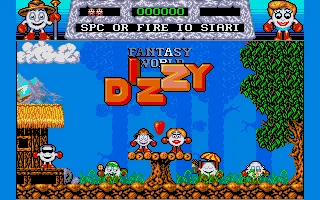
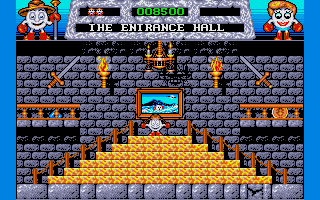
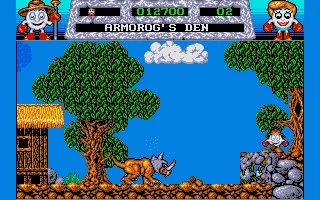
 Fantasy World Dizzy is a charming platform adventure game developed by the Oliver Twins and published by Codemasters in 1989. As the third main installment in the popular Dizzy series, the game follows the adventures of a lovable, egg-shaped hero who must rescue his girlfriend Daisy after she is kidnapped by the Evil King's trolls. Starting in a dark castle dungeon, Dizzy must escape and explore a magical world filled with mysterious locations, strange creatures, and dangerous obstacles.
The gameplay combines traditional platforming with exploration, item collection, and clever puzzle-solving. Players must navigate colorful environments, including castles, forests, caves, and magical towers, while collecting useful objects and figuring out how to use them. Along the way, Dizzy encounters the friendly Yolkfolk, avoids deadly hazards, and searches for 30 hidden gold coins. Each puzzle requires observation and logical thinking, making the adventure both entertaining and challenging.
With its delightful cartoon-style graphics, memorable characters, and whimsical atmosphere, Fantasy World Dizzy became one of the most beloved entries in the series. The MS-DOS version brings the classic adventure to PC players, preserving the addictive combination of exploration, humor, and brain-teasing puzzles. Its imaginative world and distinctive gameplay make it a nostalgic example of British gaming creativity from the late 1980s and early 1990s.
Just play it!
Tip: Press Alt + Enter to toggle fullscreen mode
Quick tips — new to MS-DOS games?
- Click inside the game to give it keyboard/mouse focus.
- Ctrl + F10 — release or re-capture the mouse cursor.
- Saving varies by game — look for Save in the in-game menu (Esc or F1), or try F5 / F7.
- Some games use passwords instead of saves — note it down!
- Controls are often shown on the game's intro or title screen — don't skip them.
- 🖥️ CRT filter is on by default for that authentic monitor look. Toggle it with Alt+F7 or the CRT: ON/OFF button in the bottom-right corner of the game. Your preference is remembered.
Playing on a phone or tablet?
MS-DOS games were built for a physical keyboard. Use the
keyboard button in the game's bottom bar to bring up
the on-screen keys, or connect a Bluetooth keyboard — some games are
hard to control by touch alone.
Explore More
More Platformer Games:
Browse all platformer games
Browse all platformer games
Games from 1989:
See all games from 1989
See all games from 1989
Developer:
More games by Codemasters
More games by Codemasters



Comments
No comments yet — be the first to say something.
New Comment