Pinball Magic
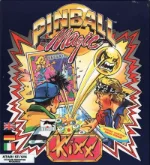 Pinball Magic is a classic pinball game developed and published by the French company Loriciel for MS-DOS in 1990. Presented from a top-down perspective, it combines traditional pinball mechanics with a more arcade-oriented progression system, offering a distinctly European take on the genre from the early PC era.
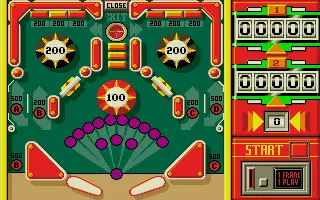
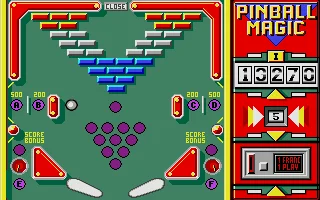
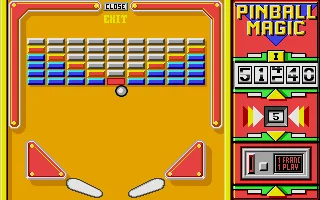
The game features twelve different tables that players must complete in sequence. Instead of simply chasing the highest possible score, the main objective is to activate the required letters and targets on each table, eventually opening an exit that allows you to advance to the next stage. Each table introduces a different layout and arrangement of bumpers, obstacles and scoring elements, giving the game a puzzle-like sense of progression alongside its fast-moving pinball action.
With its simple graphics, responsive keyboard controls and unmistakable early-1990s presentation, Pinball Magic captures the charm of DOS-era arcade games. While it does not attempt to provide a realistic pinball simulation, its unusual table progression and straightforward gameplay make it an interesting curiosity for retro gaming enthusiasts and fans of early digital pinball.
Just play it!
Tip: Press Alt + Enter to toggle fullscreen mode
Quick tips — new to MS-DOS games?
- Click inside the game to give it keyboard/mouse focus.
- Ctrl + F10 — release or re-capture the mouse cursor.
- Saving varies by game — look for Save in the in-game menu (Esc or F1), or try F5 / F7.
- Some games use passwords instead of saves — note it down!
- Controls are often shown on the game's intro or title screen — don't skip them.
- 🖥️ CRT filter is on by default for that authentic monitor look. Toggle it with Alt+F7 or the CRT: ON/OFF button in the bottom-right corner of the game. Your preference is remembered.
Playing on a phone or tablet?
MS-DOS games were built for a physical keyboard. Use the
keyboard button in the game's bottom bar to bring up
the on-screen keys, or connect a Bluetooth keyboard — some games are
hard to control by touch alone.
Explore More
More Action Games:
Browse all action games
Browse all action games
Games from 1990:
See all games from 1990
See all games from 1990
Developer:
More games by Loriciel
More games by Loriciel


Comments
No comments yet — be the first to say something.
New Comment