Star Wars: X-Wing
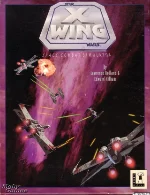 Star Wars: X-Wing is a landmark space combat simulator released in 1993 for MS-DOS by LucasArts. Set during the events of the original Star Wars trilogy, the game places the player in the role of a Rebel Alliance pilot fighting against the Galactic Empire. Rather than following a single movie plot, it expands the universe with original missions that capture the tension and heroism of the classic films.
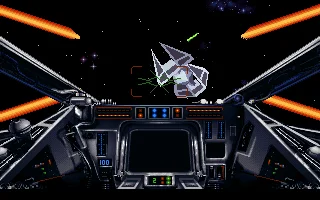
The game is renowned for its detailed and realistic approach to starfighter combat. Players must carefully manage ship systems such as shields, laser power, and engines while engaging in fast-paced dogfights and complex tactical objectives. Missions range from escorting convoys and defending capital ships to launching full-scale assaults on Imperial forces, all presented from a first-person cockpit view that was highly immersive for its time.
X-Wing was widely praised for its depth, difficulty, and technical achievements, including advanced 3D graphics and dynamic sound design. It set a new standard for flight simulators and became the foundation of a highly successful series, influencing future space combat games for years to come. Today, it is remembered as one of the most important and respected titles in the history of Star Wars video games.
Genre: Simulation
Release: 1993
Developer: Totally Games
Publisher: LucasArts
Series: Star Wars
Tags: Sci-Fi, Space, Flight, 3D, Licensed
Played: 388 times in the last 12 months
Just play it!
Tip: Press Alt + Enter to toggle fullscreen mode
Quick tips — new to MS-DOS games?
- Click inside the game to give it keyboard/mouse focus.
- Ctrl + F10 — release or re-capture the mouse cursor.
- Saving varies by game — look for Save in the in-game menu (Esc or F1), or try F5 / F7.
- Some games use passwords instead of saves — note it down!
- Controls are often shown on the game's intro or title screen — don't skip them.
- 🖥️ CRT filter is on by default for that authentic monitor look. Toggle it with Alt+F7 or the CRT: ON/OFF button in the bottom-right corner of the game. Your preference is remembered.
Playing on a phone or tablet?
MS-DOS games were built for a physical keyboard. Use the
keyboard button in the game's bottom bar to bring up
the on-screen keys, or connect a Bluetooth keyboard — some games are
hard to control by touch alone.
Enjoying Star Wars: X-Wing? Rate it or leave a comment — it helps other players find the good ones.
Star Wars: X-Wing controls
| Key | Action |
|---|---|
| Joystick or mouse | Steer; button 1 fires |
| + / - | Increase / decrease throttle |
| [ / ] / Backspace / \ | Throttle to one third / two thirds / full / zero |
| W | Cycle weapons |
| X | Cycle firing configurations |
| F9 / F10 | Adjust laser / shield recharge rate |
| Shift + F9 / Shift + F10 | Move energy from shields to lasers / from lasers to shields |
| S | Cycle shield settings |
| T / Y | Next / previous target |
| R | Target the closest enemy |
| M | Map |
| H | Hyperspace home (ends the mission) |
Explore More
More Simulation Games:
Browse all simulation games
Browse all simulation games
Games from 1993:
See all games from 1993
See all games from 1993
Developer:
More games by Totally Games
More games by Totally Games
Publisher:
Games published by LucasArts
Games published by LucasArts
The Star Wars series
- Star Wars: X-Wing (1993)
- Star Wars: TIE Fighter (1994)
- Star Wars: Dark Forces (1995)

Comments
No comments yet — be the first to say something.
New Comment