Inferno
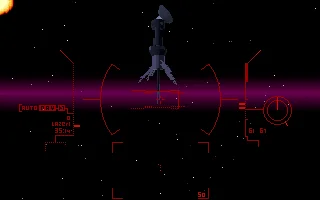
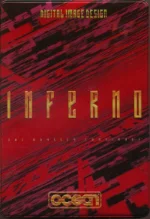 Inferno is a fast-paced action game for MS-DOS developed by Digital Image Design and released in 1994. Set in a futuristic interstellar war, the game places the player at the controls of a heavily armed spacecraft, fighting through hostile territory in space and over the surfaces of planets. Blending arcade-style shooting with early 3D graphics, Inferno delivers an intense experience where quick reflexes and spatial awareness are essential for survival.
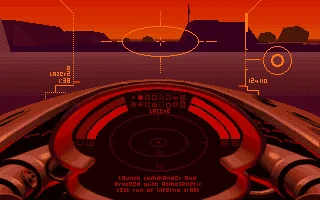
Players battle through a series of combat zones filled with enemy units, automated defenses, and environmental hazards. The gameplay emphasizes constant movement, strategic weapon use, and careful navigation through maze-like structures. Each mission challenges the player to eliminate threats while managing limited resources and avoiding traps hidden within the battlefield.
At the time of its release, Inferno stood out for its distinctive visual style and smooth real-time rendering on MS-DOS systems. Digital Image Design, known for pushing technical boundaries, created a game that combined immersive atmosphere with high-speed action. Today, Inferno remains a notable example of early 1990s PC experimentation with 3D environments and futuristic combat gameplay.
Genre: Simulation
Release: 1994
Developer: Digital Image Design
Publisher: Ocean Software
Series: Epic
Tags: Sci-Fi, Space, Flight, 3D
Played: 102 times in the last 12 months
Just play it!
Tip: Press Alt + Enter to toggle fullscreen mode
Quick tips — new to MS-DOS games?
- Click inside the game to give it keyboard/mouse focus.
- Ctrl + F10 — release or re-capture the mouse cursor.
- Saving varies by game — look for Save in the in-game menu (Esc or F1), or try F5 / F7.
- Some games use passwords instead of saves — note it down!
- Controls are often shown on the game's intro or title screen — don't skip them.
- 🖥️ CRT filter is on by default for that authentic monitor look. Toggle it with Alt+F7 or the CRT: ON/OFF button in the bottom-right corner of the game. Your preference is remembered.
Playing on a phone or tablet?
MS-DOS games were built for a physical keyboard. Use the
keyboard button in the game's bottom bar to bring up
the on-screen keys, or connect a Bluetooth keyboard — some games are
hard to control by touch alone.
Enjoying Inferno? Rate it or leave a comment — it helps other players find the good ones.
Explore More
More Simulation Games:
Browse all simulation games
Browse all simulation games
Games from 1994:
See all games from 1994
See all games from 1994
Developer:
More games by Digital Image Design
More games by Digital Image Design
Publisher:
Games published by Ocean Software
Games published by Ocean Software

Comments
No comments yet — be the first to say something.
New Comment