Strike Commander
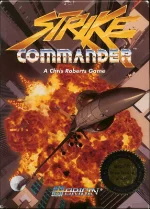 Strike Commander is a cinematic combat flight simulator released for MS-DOS in 1993 by Origin Systems. Set in a near-future world shaped by economic collapse and regional conflicts, the game places players in the cockpit of advanced fighter jets as members of a private mercenary air force. Combining arcade-style action with detailed simulation mechanics, it delivered an unusually immersive experience for its time, featuring dynamic missions, digitized speech, and impressive VGA graphics.
The game became famous for pushing contemporary PC hardware to its limits. Its advanced engine showcased texture-mapped terrain, detailed aircraft models, cinematic cutscenes, and a strong narrative focus rarely seen in flight simulators of the early 1990s. Players could manage contracts, customize weapon loadouts, and engage in intense aerial combat missions ranging from escort operations to large-scale air strikes. The ambitious technical design made Strike Commander one of the most visually impressive DOS titles of its era.
Even decades after its release, Strike Commander is remembered as one of the defining combat flight simulators of the DOS gaming generation. Developed under the direction of Chris Roberts, the title built on the cinematic storytelling style he had established with the Wing Commander series. Although demanding on hardware at launch, the game earned lasting respect for its atmosphere, presentation, and blend of simulation depth with accessible action gameplay.
Genre: Simulation
Release: 1993
Developer: Origin Systems
Publisher: Electronic Arts
Tags: Flight, Military, 3D
Played: 216 times in the last 12 months
Just play it!
Tip: Press Alt + Enter to toggle fullscreen mode
Quick tips — new to MS-DOS games?
- Click inside the game to give it keyboard/mouse focus.
- Ctrl + F10 — release or re-capture the mouse cursor.
- Saving varies by game — look for Save in the in-game menu (Esc or F1), or try F5 / F7.
- Some games use passwords instead of saves — note it down!
- Controls are often shown on the game's intro or title screen — don't skip them.
- 🖥️ CRT filter is on by default for that authentic monitor look. Toggle it with Alt+F7 or the CRT: ON/OFF button in the bottom-right corner of the game. Your preference is remembered.
Playing on a phone or tablet?
MS-DOS games were built for a physical keyboard. Use the
keyboard button in the game's bottom bar to bring up
the on-screen keys, or connect a Bluetooth keyboard — some games are
hard to control by touch alone.
Enjoying Strike Commander? Rate it or leave a comment — it helps other players find the good ones.
Strike Commander controls
| Key | Action |
|---|---|
| Arrow keys (or numpad) | Pitch and roll |
| , / . | Rudder left / right |
| 1-5 | Throttle, 20% to full military power |
| 6-0 | Afterburner stages (0 = full afterburner) |
| Space | Fire the selected weapon (also joystick button 1 / left mouse button) |
| W | Cycle weapon modes (Shift+W goes back) |
| T | Select next target |
| F / B | Flaps / brakes |
| A | Autopilot (also auto take-off and landing) |
| N / D / C | Nav map / damage display / communications |
| F1 / F2 | Cockpit view / chase camera |
| F3 / F4 / F5 | Look left / right / back |
| Tab | 6x time burst while held (Shift+Tab: 2x / 4x time compression) |
| Alt+P / Alt+O / Alt+X | Pause / game options / exit to DOS |
Strike Commander cheats & tips
| Code | Effect |
|---|---|
| Alt+O | Opens the option screens during flight - pick the Rookie level, or change single settings |
| Tip | On those screens, switching on Unlimited Ammo, Easy Gun Hits and Easy Landings, and switching off Mid-Air Collisions and Stalls, makes missions much easier |


Explore More
More Simulation Games:
Browse all simulation games
Browse all simulation games
Games from 1993:
See all games from 1993
See all games from 1993
Developer:
More games by Origin Systems
More games by Origin Systems
Publisher:
Games published by Electronic Arts
Games published by Electronic Arts




Comments
No comments yet — be the first to say something.
New Comment